SelectList
Pick one or many items from a fully visible list of rich options.
A <SelectList> lets users pick from a list where each option carries additional information beyond a label, like a description, a logo, or a per-row action. Every option stays visible so users can scan and compare without opening anything.
The trade-off is space. A <SelectList> takes more vertical room than a <Radio.Group> or a <Select>, so reach for it when the decision earns the weight: picking a payment method, comparing plans, choosing a shipping speed. For simple text choices, a lighter control reads faster.
Anatomy
A <SelectList> is a labeled container holding a stack of <SelectList.Option> rows. Each row pairs a selection indicator with a label over an optional description, and an optional trailing action.
- Label: Names the field above the list.
- List: The container that holds all options.
- Option: A single row representing one choice.
- Selection indicator: A radio circle for single selection, or a checkbox for multiple selection.
- Text value: The primary text of an option.
- Description: Optional secondary text within an option that helps the user decide.
- Action: An optional trailing button or menu for a per-row action that does not toggle the row.
Appearance
The appearance of a component can be customized using the variant and size props. These props adjust the visual style and dimensions of the component, available values are based on the active theme.
| Property | Type | Description |
|---|---|---|
variant | default | bordered | The available variants of this component. |
size | - | The available sizes of this component. |
<SelectList> has two variants. They handle two different framings of the same choice: rows in a continuous list, or peer cards to commit to.
| Variant | Description | When to use |
|---|---|---|
default | A single surface with dividers between rows. | Reads as one continuous list of entries. Default choice. Scans faster on longer lists. |
bordered | Each row is its own outlined card with a small gap. | Commit-level, peer-to-peer choices like plans, payment methods, or shipping modes. Avoid for long lists. |
Usage
Hidden lists make users do invisible work. Comparing two options in a dropdown means opening it, scanning, closing it, opening it again, scanning, then deciding, all while keeping the rest of the form alive in their head. <SelectList> moves that work out of memory and into the layout: every option is on screen, so the comparison happens once and stays put. Each row also has space for one inline action, like a "View details" button or a "Configure" menu, that does not trigger selection. <Radio.Group> and <Select> can't host that.
Use <SelectList> when comparison is the point of the field, not when it is one step among many. That usually means a peer-level choice where each option is its own commitment, and getting it right matters more than moving through the form quickly.
Options as cards
The bordered variant renders each option as its own outlined card with a small gap between rows, instead of a continuous surface with dividers. Reach for it when the choice is commit-level and each option is a peer the user weighs against the others, like event spaces, subscription plans, payment methods, or shipping modes. The card framing reads as "pick one of these" more strongly than a plain list, and each card has room for a thumbnail, a title, and a short description, the same anatomy as a <Card>.
This is also the answer whenever you catch yourself wanting a grid of selectable cards. <Card> renders a non-interactive <article> for grouping content, so it has no selection, form, or keyboard support. A bordered <SelectList> keeps the card look while owning the selection state, the value the form submits, and the keyboard navigation.
Set variant="bordered" and pick a selectionMode. The example below takes the venue card grid and rebuilds it as a selectable list, laid out with orientation="horizontal" so the cards sit side by side. Each option keeps the same photo, title, and details, and now carries single selection and the value the form submits.
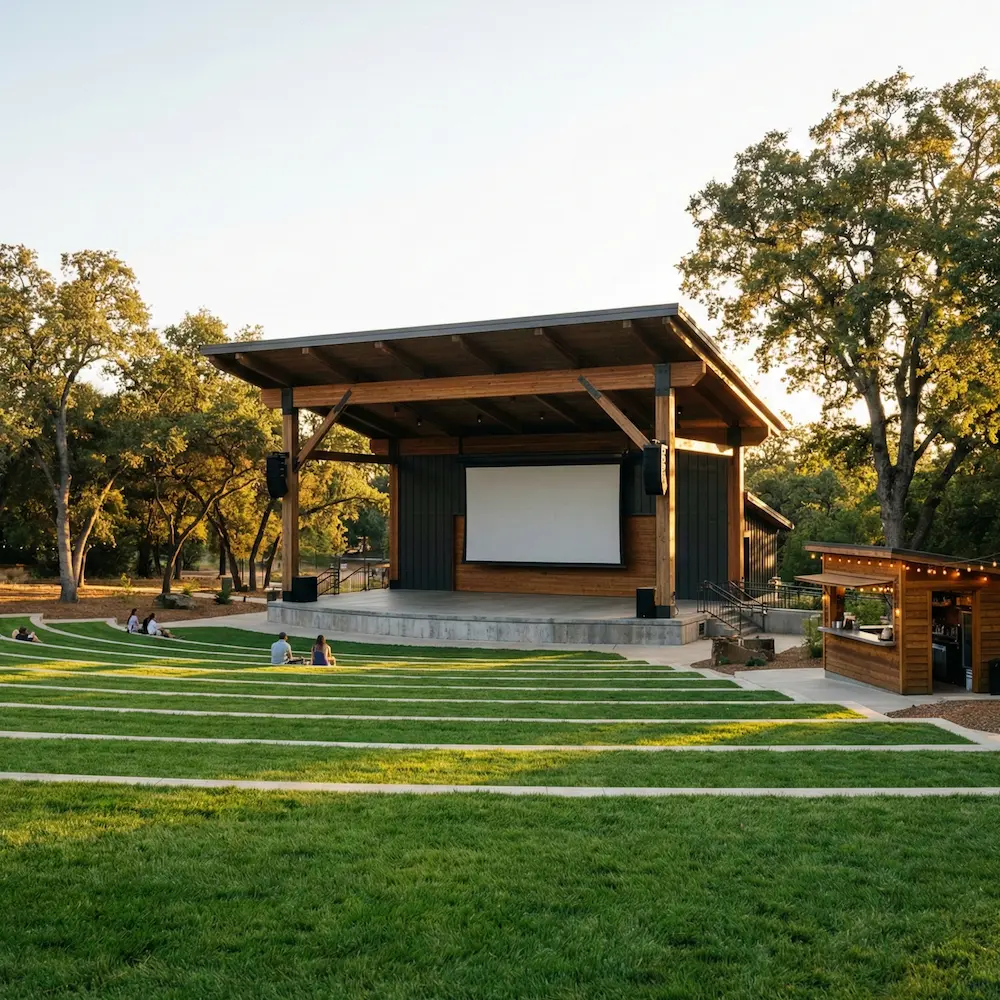
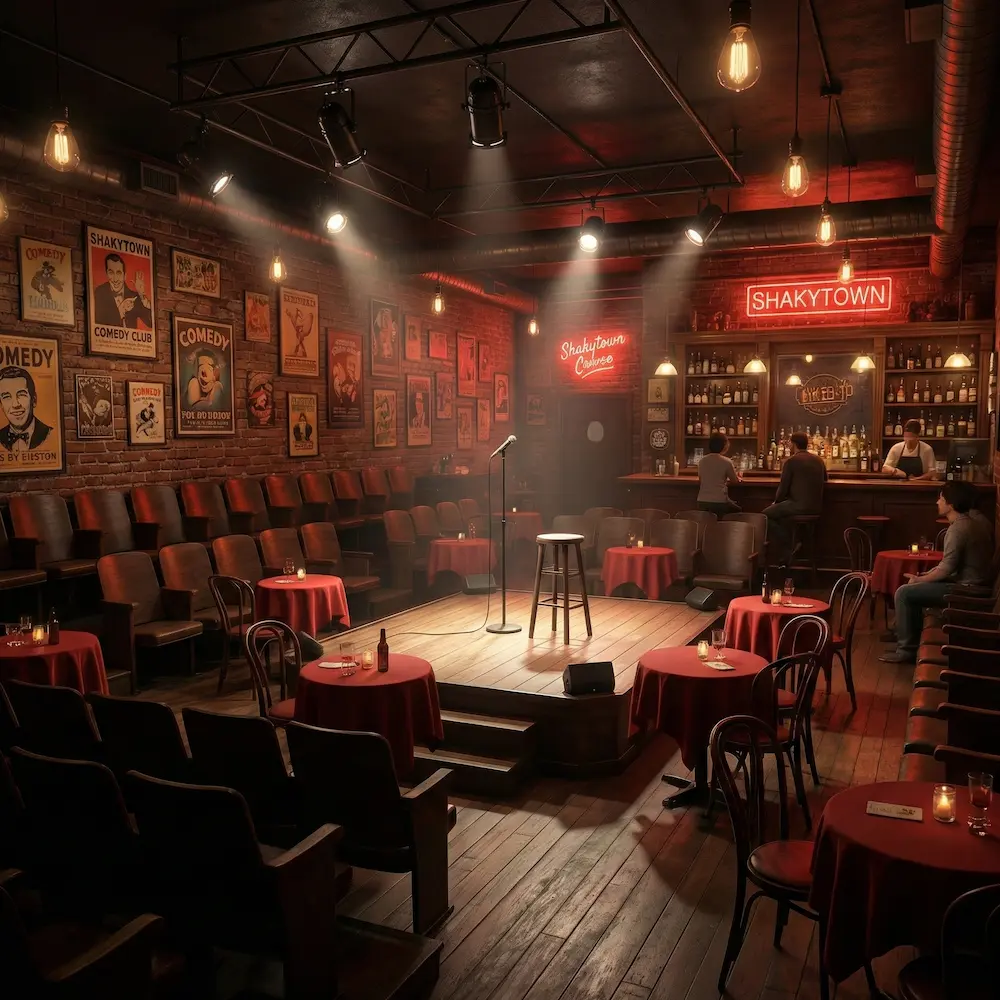
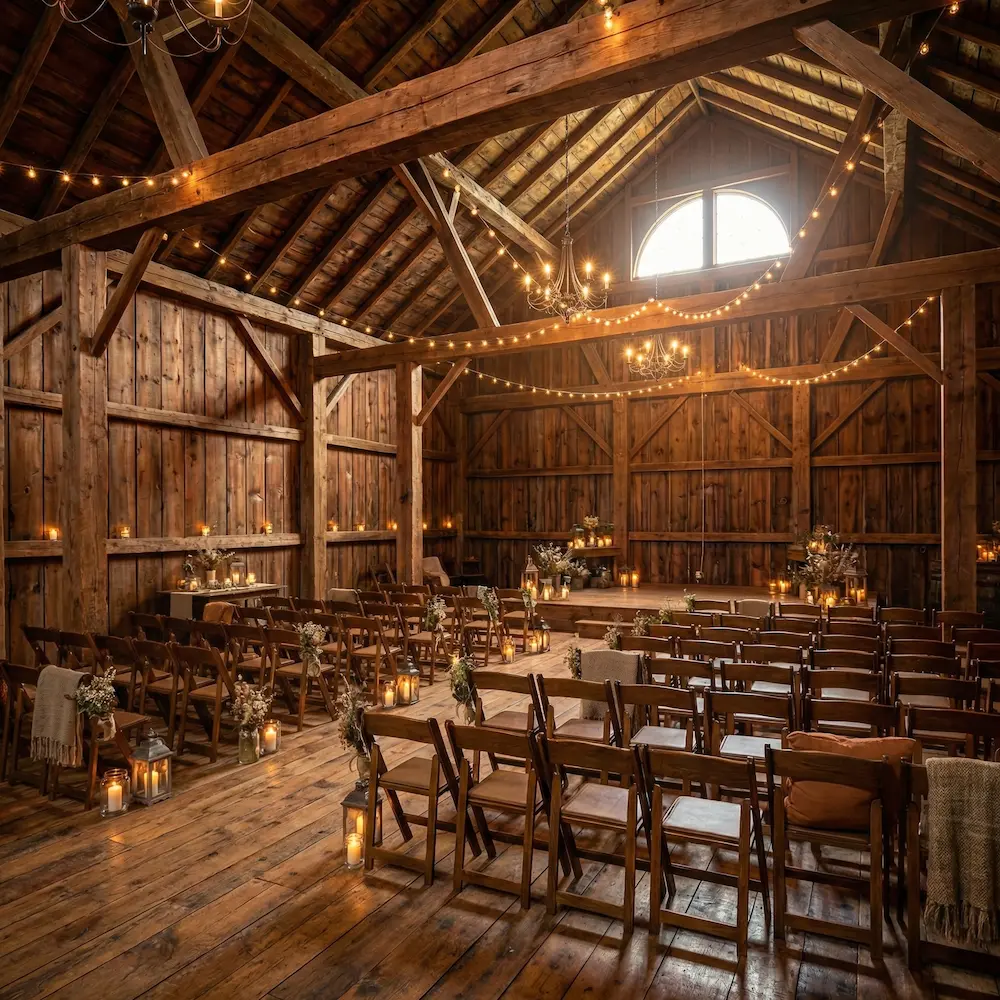
import { venueTypes, venues } from '@/lib/data/venues';import { Badge, Inline, SelectList, Stack, Text } from '@marigold/components';const featured = venues.slice(0, 3);export default () => ( <SelectList label="Event space" description="Pick the venue to book. You can change it before you confirm." variant="bordered" orientation="horizontal" selectionMode="single" defaultSelectedKeys={[featured[0].id]} > {featured.map(venue => ( <SelectList.Option key={venue.id} id={venue.id} textValue={`${venue.name}, ${venueTypes[venue.type]}`} > <div className="col-start-2 row-span-2 w-48 min-w-0"> <Stack space="regular"> <img src={venue.image} alt="" className="h-40 w-full max-w-full rounded-sm object-cover" /> <Stack space={1}> {/* Reserve two lines so a one-line title (e.g. "Oak Ridge Barn") keeps every horizontal tile the same height, which keeps the photos aligned across the row. */} <div className="min-h-14"> <Text size="lg" weight="semibold"> {venue.name} </Text> </div> <Text size="sm" variant="muted"> {venue.city}, {venue.country} </Text> </Stack> <Stack space="tight"> <Inline space="related"> <Badge variant="info">{venueTypes[venue.type]}</Badge> </Inline> <Text size="sm" variant="muted"> Up to {venue.capacity.toLocaleString()} guests </Text> </Stack> <Inline space="related" alignY="center"> <Text size="sm" weight="bold"> ${venue.price.from.toLocaleString()} </Text> </Inline> </Stack> </div> </SelectList.Option> ))} </SelectList>);Number of options
The right control depends on list length and how much space the field can take. <SelectList> earns its space when comparing options side by side or hosting per-row actions matters. For shorter lists of plain choices, longer lists, or when space is tight, a lighter control fits better. The table below maps common situations to the control that fits.
| When | Use |
|---|---|
| Short list of plain text choices (3 to 5 items) | <Radio.Group> (single) or <Checkbox.Group> (multiple) |
| Each option needs decision-relevant context (up to 10 items) | <SelectList> |
| Space is limited, with or without rich rows (5 to 15 items) | <Select> (single or multiple) |
| More than ~15 options, or users need to search | <Combobox> or <TagField> |
Writing options
The label, description, and order of each row decide whether the list reads at a glance or makes users work for it.
Keep labels short and concrete. Lead with the most distinctive word, since that's where the eye lands first. The description line earns its space when it differentiates options that look similar at the title level. Skip it for marketing copy, restated labels, or boilerplate that repeats on every row (like "All major cards accepted").
Be consistent. All rows should follow the same shape: either every row has a description or none of them do. Mixed-height rows break the visual rhythm and slow scanning.
Order by what users pick most often. Readers scan top to bottom (or left to right), so the most common choice belongs first. Avoid alphabetical or system-driven order: a "Bank transfer" sorted to the top alphabetically is unhelpful when most users pay by card. If options have a natural progression (free → pro → enterprise, or fastest → cheapest), follow that order instead.
Keep it accessible
When a row contains more than plain text (a wrapped label, a logo, a trailing
action), pass textValue on the option. Screen readers use it as the option's
accessible name.
Do
Keep labels short, lead with the most distinctive word, and order options by how often users pick them.
Don't
Don't mix one-line and two-line rows in the same list, and don't truncate labels with an ellipsis.
Multiselection
Sometimes users need to pick several options and see what they picked at a glance. A multi-select <Select> truncates as picks pile up. <SelectList> keeps every option and every checkmark on screen. That's the right trade when the selection itself matters as much as the choosing: which payment methods accept checkout traffic, which channels deliver a given notification, which features ship in a plan.
Set selectionMode="multiple" to switch the list to checkboxes.
import { useState } from 'react';import { Badge, Description, Inline, SelectList, Stack, Text, TextValue,} from '@marigold/components';const VisaLogo = () => ( <svg aria-hidden width={54} height={36} viewBox="0 0 120 80" className="shrink-0 rounded-sm" > <rect width="120" height="80" rx="4" fill="white" /> <path fillRule="evenodd" clipRule="evenodd" d="M86.6666 44.9375L90.3239 35.0625L92.3809 44.9375H86.6666ZM100.952 52.8375L95.8086 27.1625H88.7383C86.3525 27.1625 85.7723 29.0759 85.7723 29.0759L76.1904 52.8375H82.8868L84.2269 49.0244H92.3947L93.1479 52.8375H100.952Z" fill="#1434CB" /> <path fillRule="evenodd" clipRule="evenodd" d="M77.1866 33.5711L78.0952 28.244C78.0952 28.244 75.2896 27.1625 72.3648 27.1625C69.2031 27.1625 61.6955 28.5638 61.6955 35.3738C61.6955 41.7825 70.5071 41.8621 70.5071 45.2266C70.5071 48.5912 62.6034 47.9901 59.9955 45.8676L59.0476 51.4362C59.0476 51.4362 61.8919 52.8375 66.2397 52.8375C70.5869 52.8375 77.1467 50.5544 77.1467 44.3455C77.1467 37.8964 68.2552 37.296 68.2552 34.4921C68.2552 31.6882 74.4602 32.0484 77.1866 33.5711Z" fill="#1434CB" /> <path fillRule="evenodd" clipRule="evenodd" d="M54.6517 52.8375H47.6191L52.0144 27.1625H59.0477L54.6517 52.8375Z" fill="#1434CB" /> <path fillRule="evenodd" clipRule="evenodd" d="M42.3113 27.1625L35.9217 44.8213L35.1663 41.0185L35.167 41.0199L32.9114 29.4749C32.9114 29.4749 32.6394 27.1625 29.7324 27.1625H19.1709L19.0476 27.5966C19.0476 27.5966 22.2782 28.2669 26.057 30.5326L31.8793 52.8375H38.8617L49.5238 27.1625H42.3113Z" fill="#1434CB" /> </svg>);const PayPalLogo = () => ( <svg aria-hidden width={54} height={36} viewBox="0 0 120 80" className="shrink-0 rounded-sm" > <rect width="120" height="80" rx="4" fill="white" /> <path fillRule="evenodd" clipRule="evenodd" d="M76.2315 34.67C75.8559 37.1343 73.9727 37.1343 72.1505 37.1343H71.1141L71.8414 32.5332C71.8848 32.2553 72.1248 32.0508 72.4065 32.0508H72.8822C74.1224 32.0508 75.2934 32.0508 75.8975 32.7563C76.2589 33.1785 76.3679 33.8052 76.2315 34.67ZM75.4387 28.2401H68.5683C68.0979 28.2401 67.6984 28.5818 67.6249 29.0456L64.847 46.6499C64.7921 46.9969 65.0613 47.3112 65.4121 47.3112H68.9377C69.2663 47.3112 69.5462 47.0722 69.5976 46.7482L70.386 41.7567C70.4586 41.2929 70.859 40.9512 71.3285 40.9512H73.5023C78.0279 40.9512 80.6402 38.7631 81.3223 34.4248C81.6297 32.5288 81.3347 31.0382 80.4462 29.9945C79.4692 28.8474 77.7374 28.2401 75.4387 28.2401Z" fill="#009CDE" /> <path fillRule="evenodd" clipRule="evenodd" d="M27.2281 34.67C26.8525 37.1343 24.9693 37.1343 23.1471 37.1343H22.1107L22.838 32.5332C22.8814 32.2553 23.1214 32.0508 23.4031 32.0508H23.8788C25.119 32.0508 26.29 32.0508 26.8941 32.7563C27.2556 33.1785 27.3645 33.8052 27.2281 34.67ZM26.4353 28.2401H19.5649C19.0945 28.2401 18.695 28.5818 18.6215 29.0456L15.8436 46.6499C15.7887 46.9969 16.0571 47.3112 16.4087 47.3112H19.6898C20.1593 47.3112 20.5588 46.9695 20.6323 46.5065L21.3826 41.7567C21.4552 41.2929 21.8556 40.9512 22.3251 40.9512H24.4989C29.0245 40.9512 31.6368 38.7631 32.3189 34.4248C32.6263 32.5288 32.3313 31.0382 31.4428 29.9945C30.4658 28.8474 28.734 28.2401 26.4353 28.2401Z" fill="#003087" /> <path fillRule="evenodd" clipRule="evenodd" d="M42.3858 40.9899C42.0678 42.8683 40.5761 44.1296 38.6724 44.1296C37.7184 44.1296 36.954 43.8225 36.4632 43.2418C35.9769 42.6665 35.7935 41.8459 35.9477 40.9333C36.2435 39.0709 37.7601 37.7697 39.6344 37.7697C40.569 37.7697 41.3272 38.0795 41.8277 38.6655C42.3317 39.2559 42.5302 40.0809 42.3858 40.9899ZM46.9708 34.591H43.6808C43.3992 34.591 43.1591 34.7955 43.1148 35.0743L42.9704 35.9931L42.741 35.6603C42.0279 34.6273 40.4396 34.2812 38.854 34.2812C35.2195 34.2812 32.1147 37.0341 31.5106 40.8943C31.1961 42.8205 31.6426 44.6607 32.7357 45.9451C33.7393 47.1251 35.1717 47.6163 36.8787 47.6163C39.8089 47.6163 41.4335 45.7362 41.4335 45.7362L41.2865 46.6497C41.2316 46.9967 41.5 47.311 41.8525 47.311H44.8147C45.2851 47.311 45.6846 46.9702 45.7581 46.5063L47.5368 35.2523C47.5917 34.9053 47.3224 34.591 46.9708 34.591Z" fill="#003087" /> <path fillRule="evenodd" clipRule="evenodd" d="M91.3887 40.9899C91.0707 42.8683 89.579 44.1296 87.6754 44.1296C86.7213 44.1296 85.9569 43.8225 85.4661 43.2418C84.9789 42.6665 84.7965 41.8459 84.9506 40.9333C85.2465 39.0709 86.763 37.7697 88.6374 37.7697C89.5719 37.7697 90.3302 38.0795 90.8306 38.6655C91.3347 39.2559 91.5331 40.0809 91.3887 40.9899ZM95.9737 34.591H92.6838C92.4021 34.591 92.162 34.7955 92.1177 35.0743L91.9734 35.9931L91.743 35.6603C91.0308 34.6273 89.4426 34.2812 87.857 34.2812C84.2225 34.2812 81.1177 37.0341 80.5135 40.8943C80.1991 42.8205 80.6455 44.6607 81.7386 45.9451C82.7423 47.1251 84.1746 47.6163 85.8816 47.6163C88.8119 47.6163 90.4365 45.7362 90.4365 45.7362L90.2894 46.6497C90.2345 46.9967 90.5029 47.311 90.8555 47.311H93.8176C94.288 47.311 94.6875 46.9702 94.761 46.5063L96.5397 35.2523C96.5947 34.9053 96.3254 34.591 95.9737 34.591Z" fill="#009CDE" /> <path fillRule="evenodd" clipRule="evenodd" d="M64.4927 34.5911H61.186C60.8697 34.5911 60.5739 34.7478 60.3967 35.0098L55.8347 41.7229L53.9019 35.2718C53.7805 34.8682 53.4085 34.5911 52.9868 34.5911H49.7368C49.3444 34.5911 49.068 34.977 49.1947 35.3479L52.8354 46.0284L49.4108 50.857C49.1424 51.2359 49.4135 51.7599 49.8785 51.7599H53.1817C53.4944 51.7599 53.7876 51.6068 53.9665 51.3501L64.9631 35.4896C65.2262 35.1098 64.9551 34.5911 64.4927 34.5911Z" fill="#003087" /> <path fillRule="evenodd" clipRule="evenodd" d="M99.8516 28.7239L97.0321 46.6504C96.9771 46.9973 97.2455 47.3116 97.5972 47.3116H100.434C100.903 47.3116 101.303 46.9699 101.376 46.5061L104.157 28.9018C104.212 28.5548 103.943 28.2406 103.591 28.2406H100.418C100.135 28.2406 99.895 28.445 99.8516 28.7239Z" fill="#009CDE" /> </svg>);const KlarnaLogo = () => ( <svg aria-hidden width={54} height={36} viewBox="0 0 120 80" className="shrink-0 rounded-sm" > <rect width="120" height="80" rx="4" fill="#FFA8CD" /> <path d="M92.5714 46.1922C90.7118 46.1922 89.2625 44.6544 89.2625 42.7872C89.2625 40.9199 90.7118 39.3822 92.5714 39.3822C94.4309 39.3822 95.8803 40.9199 95.8803 42.7872C95.8803 44.6544 94.4309 46.1922 92.5714 46.1922ZM91.6412 49.7894C93.2276 49.7894 95.2514 49.1853 96.373 46.8237L96.482 46.8787C95.99 48.1692 95.99 48.9382 95.99 49.1304V49.4324H99.9824V36.1419H95.99V36.444C95.99 36.6362 95.99 37.4051 96.482 38.6957L96.373 38.7506C95.2514 36.3891 93.2276 35.7849 91.6412 35.7849C87.8404 35.7849 85.1604 38.8055 85.1604 42.7872C85.1604 46.7688 87.8404 49.7894 91.6412 49.7894ZM78.2138 35.7849C76.4088 35.7849 74.9867 36.4165 73.8381 38.7506L73.7288 38.6957C74.221 37.4051 74.221 36.6362 74.221 36.444V36.1419H70.2282V49.4324H74.3304V42.4302C74.3304 40.5904 75.397 39.4371 77.1199 39.4371C78.8428 39.4371 79.6906 40.4256 79.6906 42.4027V49.4324H83.7928V40.9748C83.7928 37.9543 81.4405 35.7849 78.2138 35.7849ZM64.2938 38.7506L64.1843 38.6957C64.6766 37.4051 64.6766 36.6362 64.6766 36.444V36.1419H60.6839V49.4324H64.786L64.8133 43.0343C64.8133 41.1671 65.7979 40.0412 67.4114 40.0412C67.849 40.0412 68.2045 40.0961 68.6147 40.206V36.1419C66.8097 35.7575 65.1962 36.444 64.2938 38.7506ZM51.2489 46.1922C49.3892 46.1922 47.9397 44.6544 47.9397 42.7872C47.9397 40.9199 49.3892 39.3822 51.2489 39.3822C53.1085 39.3822 54.5579 40.9199 54.5579 42.7872C54.5579 44.6544 53.1085 46.1922 51.2489 46.1922ZM50.319 49.7894C51.9052 49.7894 53.9289 49.1853 55.0502 46.8237L55.1595 46.8787C54.6673 48.1692 54.6673 48.9382 54.6673 49.1304V49.4324H58.6601V36.1419H54.6673V36.444C54.6673 36.6362 54.6673 37.4051 55.1595 38.6957L55.0502 38.7506C53.9289 36.3891 51.9052 35.7849 50.319 35.7849C46.5176 35.7849 43.8376 38.8055 43.8376 42.7872C43.8376 46.7688 46.5176 49.7894 50.319 49.7894ZM38.1219 49.4324H42.2241V30.2106H38.1219V49.4324ZM35.1136 30.2106H30.9294C30.9294 33.6431 28.8236 36.7186 25.6239 38.9153L24.3659 39.7941V30.2106H20.0176V49.4324H24.3659V39.9039L31.5584 49.4324H36.8639L29.9449 40.3158C33.0898 38.0367 35.141 34.4943 35.1136 30.2106Z" fill="#0B051D" /> </svg>);const SepaLogo = () => ( <svg aria-hidden width={54} height={36} viewBox="0 0 120 80" className="shrink-0 rounded-sm" > <rect width="120" height="80" rx="4" fill="white" /> <path fillRule="evenodd" clipRule="evenodd" d="M61.7961 51.0291L61.7626 52.2779H57.8379V46.1184H59.2417V51.0291H61.7961Z" fill="#005DA1" /> <path fillRule="evenodd" clipRule="evenodd" d="M65.3571 50.1424C65.2336 50.0933 64.9856 50.0354 64.6468 50.0354C64.0768 50.0354 63.8121 50.2573 63.8121 50.6922C63.8121 51.1772 64.1015 51.3499 64.5242 51.3499C64.9609 51.3499 65.3571 51.0868 65.3571 50.7668V50.1424ZM65.5486 51.8015L65.523 51.7928C65.2177 52.1541 64.7386 52.3601 64.1668 52.3601C63.2174 52.3601 62.6147 51.8261 62.6147 50.7089C62.6147 49.789 63.2589 49.1567 64.3989 49.1567C64.7703 49.1567 65.0924 49.2146 65.3571 49.2962V49.0094C65.3571 48.5078 65.0924 48.2781 64.4077 48.2781C63.8545 48.2781 63.4909 48.3605 63.0268 48.549L62.9192 47.5309C63.4247 47.3169 63.9939 47.2021 64.6389 47.2021C66.1177 47.2021 66.6303 47.8343 66.6303 49.1979V52.2777H65.6465L65.5486 51.8015Z" fill="#005DA1" /> <path fillRule="evenodd" clipRule="evenodd" d="M69.4 52.3767C68.7956 52.3767 68.2503 52.2618 67.8294 52.0321L67.9609 50.9806C68.3756 51.2183 68.9624 51.3332 69.3912 51.3332C69.9038 51.3332 70.1183 51.128 70.1183 50.8324C70.1183 50.0353 67.7968 50.4957 67.7968 48.755C67.7968 47.8597 68.4083 47.2186 69.6974 47.2186C70.2003 47.2186 70.698 47.3177 71.118 47.4896L71.0112 48.5323C70.5974 48.3604 70.0441 48.278 69.6727 48.278C69.2518 48.278 69.0188 48.4428 69.0188 48.6971C69.0188 49.4522 71.3085 49.0006 71.3085 50.7176C71.3085 51.7111 70.7544 52.3767 69.4 52.3767Z" fill="#005DA1" /> <path fillRule="evenodd" clipRule="evenodd" d="M73.8302 48.2537V50.7994C73.8302 51.1861 74.0287 51.3501 74.4249 51.3501C74.5573 51.3501 74.7302 51.3255 74.822 51.2922L74.8961 52.22C74.7223 52.2945 74.3923 52.3603 74.0358 52.3603C73.037 52.3603 72.549 51.785 72.549 50.8406V48.2537H71.987V47.3013H72.6064L72.8208 46.1754L73.8302 46.085V47.3013H74.9464V48.2537H73.8302Z" fill="#005DA1" /> <path fillRule="evenodd" clipRule="evenodd" d="M97.9976 52.2778V48.2457H97.3693V47.3013H97.9976V47.0873C97.9976 46.3401 98.5182 45.7245 99.7155 45.7245C99.9979 45.7245 100.31 45.7649 100.526 45.8307L100.451 46.6523C100.302 46.619 100.138 46.6032 99.9714 46.6032C99.4693 46.6032 99.2779 46.7997 99.2779 47.1206V47.3013H100.344V48.2457H99.2779V52.2778H97.9976Z" fill="#005DA1" /> <path fillRule="evenodd" clipRule="evenodd" d="M94.8401 52.2778V47.3337L96.154 47.2758V52.2778H94.8401ZM95.501 46.7672C95.0051 46.7672 94.766 46.6269 94.766 46.2253C94.766 45.8719 95.0051 45.6746 95.501 45.6746C96.0057 45.6746 96.2281 45.864 96.2281 46.2253C96.2281 46.5866 96.0057 46.7672 95.501 46.7672Z" fill="#005DA1" /> <path fillRule="evenodd" clipRule="evenodd" d="M90.5345 52.2778V47.3337L91.5581 47.2846L91.6745 48.1142H91.6983C92.0133 47.5143 92.5013 47.2188 93.0713 47.2188C93.2945 47.2188 93.4842 47.2521 93.6157 47.2925L93.5328 48.5491C93.3775 48.5 93.1869 48.4667 92.9875 48.4667C92.3186 48.4667 91.8236 48.9516 91.8236 49.7812V52.2778H90.5345Z" fill="#005DA1" /> <path fillRule="evenodd" clipRule="evenodd" d="M87.9053 52.2778V49.1077C87.9053 48.5982 87.6494 48.3351 87.1041 48.3351C86.7318 48.3351 86.4097 48.5 86.2527 48.7131V52.2778H84.9715V45.8885L86.2527 45.8228V46.9557L86.2359 47.6126L86.2606 47.6301C86.633 47.317 87.0856 47.2022 87.5091 47.2022C88.5662 47.2022 89.1856 47.909 89.1856 49.1077V52.2778H87.9053Z" fill="#005DA1" /> <path fillRule="evenodd" clipRule="evenodd" d="M83.6814 48.5161C83.4256 48.4258 83.1194 48.36 82.83 48.36C81.8973 48.36 81.5903 48.7459 81.5903 49.7973C81.5903 50.8654 82.0288 51.2837 82.8053 51.2837C83.1361 51.2837 83.4503 51.2179 83.715 51.0952L83.8067 52.0887C83.5094 52.2694 83.062 52.3764 82.5247 52.3764C81.0458 52.3764 80.2597 51.538 80.2597 49.7973C80.2597 48.1461 80.9461 47.2183 82.5494 47.2183C82.9703 47.2183 83.4423 47.3086 83.7556 47.4323L83.6814 48.5161Z" fill="#005DA1" /> <path fillRule="evenodd" clipRule="evenodd" d="M77.4249 52.3767C76.8213 52.3767 76.276 52.2618 75.8543 52.0321L75.9866 50.9806C76.4005 51.2183 76.9872 51.3332 77.4169 51.3332C77.9296 51.3332 78.144 51.128 78.144 50.8324C78.144 50.0353 75.8225 50.4957 75.8225 48.755C75.8225 47.8597 76.4331 47.2186 77.7231 47.2186C78.226 47.2186 78.7228 47.3177 79.1437 47.4896L79.0369 48.5323C78.6231 48.3604 78.0699 48.278 77.6984 48.278C77.2766 48.278 77.0446 48.4428 77.0446 48.6971C77.0446 49.4522 79.3343 49.0006 79.3343 50.7176C79.3343 51.7111 78.7802 52.3767 77.4249 52.3767Z" fill="#005DA1" /> <path fillRule="evenodd" clipRule="evenodd" d="M102.973 48.2537V50.7994C102.973 51.1861 103.171 51.3501 103.567 51.3501C103.699 51.3501 103.873 51.3255 103.964 51.2922L104.038 52.22C103.865 52.2945 103.535 52.3603 103.178 52.3603C102.179 52.3603 101.691 51.785 101.691 50.8406V48.2537H101.128V47.3013H101.748L101.963 46.1754L102.973 46.085V47.3013H104.088V48.2537H102.973Z" fill="#005DA1" /> <path fillRule="evenodd" clipRule="evenodd" d="M61.9028 42.6681C60.3543 42.6681 58.9311 42.2971 57.7734 41.678L58.1652 39.113C59.3405 39.7321 60.5502 40.0864 61.8667 40.0864C63.3261 40.0864 63.9676 39.5559 63.9676 38.636C63.9676 36.5489 57.8273 37.4328 57.8273 32.993C57.8273 30.7472 59.2867 28.9249 62.6679 28.9249C63.9676 28.9249 65.3731 29.1906 66.4055 29.6151L66.0323 32.1266C64.9284 31.7732 63.8255 31.561 62.8108 31.561C61.1555 31.561 60.7108 32.1266 60.7108 32.8342C60.7108 34.9038 66.8502 33.9488 66.8502 38.4413C66.8502 41.0589 65.0167 42.6681 61.9028 42.6681Z" fill="#005DA1" /> <path fillRule="evenodd" clipRule="evenodd" d="M78.421 39.8206V42.4207H69.3451V29.1555H78.421V31.7906H72.3531V34.4258H77.2819V36.7961H72.3531V39.8206H78.421Z" fill="#005DA1" /> <path fillRule="evenodd" clipRule="evenodd" d="M85.8635 31.6491H84.0829V35.7171H85.8635C87.3406 35.7171 87.9803 35.3462 87.9803 33.6835C87.9803 32.0911 87.4121 31.6491 85.8635 31.6491ZM85.8635 38.105H84.0829V42.4212H81.0759V29.1551H85.8635C89.565 29.1551 91.0774 30.6055 91.0774 33.7011C91.0774 36.4958 89.5835 38.105 85.8635 38.105Z" fill="#005DA1" /> <path fillRule="evenodd" clipRule="evenodd" d="M97.4702 32.7984L96.1352 37.3443H99.5349L98.2528 32.7984L97.8972 31.4014H97.8434L97.4702 32.7984ZM100.246 39.8383H95.4055L94.6581 42.4209H91.4905L96.0999 29.1556H99.6769L104.339 42.4209H100.993L100.246 39.8383Z" fill="#005DA1" /> <path fillRule="evenodd" clipRule="evenodd" d="M29.6441 39.6275C29.6018 39.6836 29.5374 39.7117 29.4712 39.7257C29.3971 39.7345 29.3203 39.7178 29.2568 39.6705L25.8235 37.1072L21.2291 33.6776L17.795 31.1135C17.7324 31.0661 17.6953 30.9977 17.6821 30.924C17.6777 30.8574 17.6874 30.7881 17.7297 30.732L18.6659 29.4929C18.6659 29.4929 19.6938 28.1714 20.5965 26.9779L24.4603 29.863L28.6462 32.9883L32.5109 35.8734C31.6082 37.0669 30.5803 38.3884 30.5803 38.3884L29.6441 39.6275ZM23.1862 24.0034L26.5991 26.5526L28.9065 28.2749L31.2121 29.998L34.6268 32.5455C34.7582 32.6428 34.7856 32.8261 34.6885 32.9541L33.8697 34.0748L30.0059 31.1897L25.82 28.0644L21.9562 25.1793L22.7741 24.0586C22.8703 23.9306 23.0556 23.906 23.1862 24.0034ZM35.0177 32.0491L29.2868 27.7715L23.5568 23.4921C23.1571 23.1948 22.5906 23.2738 22.2915 23.6693L17.2471 30.3435C17.1668 30.4479 17.1191 30.5636 17.0909 30.6838C17.0044 31.024 17.1244 31.4002 17.4235 31.6247L20.8391 34.1739L25.453 37.6185L28.8668 40.1668C29.1668 40.3913 29.5638 40.4009 29.8682 40.2221C29.9768 40.1633 30.0747 40.0844 30.1541 39.98L35.1985 33.3066C35.4977 32.9111 35.4165 32.3473 35.0177 32.0491Z" fill="#A4AAB6" /> <path fillRule="evenodd" clipRule="evenodd" d="M16.4587 56.1126L20.484 42.8281H31.3907L30.451 44.0786L29.0975 45.9368L28.944 46.2113L28.8019 46.5305L28.6563 46.89L28.5046 47.2715L28.359 47.6871L28.2152 48.0958L28.0802 48.507L27.9469 48.9104L27.8269 49.2928L27.7166 49.6453L27.6187 49.9531L27.5446 50.21L27.4872 50.4056L27.4396 50.5275C27.4396 50.5275 27.4316 50.5538 27.4078 50.5854C27.3805 50.6231 27.2155 50.773 27.0813 50.6739C26.9525 50.5783 26.9657 50.2416 26.979 50.0811C27.0196 49.5892 27.0593 49.0972 27.0999 48.6061C27.1122 48.4334 26.9004 48.336 26.7637 48.4141C26.161 48.7587 25.8019 49.1761 25.4728 49.6532C25.5037 49.5418 25.5346 49.4296 25.5646 49.3182C25.704 48.8113 25.899 48.2869 25.974 47.766C26.0163 47.4688 25.9405 47.1154 25.591 47.0584C25.1975 46.9926 24.9399 47.4039 24.7475 47.6748C24.1643 48.4921 23.821 49.5304 23.0975 50.2416C22.8249 50.5091 22.5231 50.7064 22.1322 50.5959C21.6778 50.4678 21.5013 50.9984 22.3025 51.0703C23.0905 51.1404 23.6763 50.3135 24.0337 49.7356C24.2931 49.3156 24.5216 48.8771 24.774 48.4536C24.8957 48.2501 25.0219 48.0493 25.1613 47.8572C25.2222 47.7757 25.336 47.5565 25.4419 47.5275C25.5813 47.4889 25.5452 47.5687 25.5372 47.6784C25.5187 47.9256 25.4128 48.18 25.3475 48.4185C25.2769 48.6789 25.2054 48.9394 25.134 49.1998C24.9813 49.7584 24.8296 50.317 24.6769 50.8747C24.6081 51.1282 24.9434 51.2457 25.0846 51.0457C25.6457 50.2512 25.9255 49.5778 26.6172 49.0464C26.6022 49.2209 26.5881 49.3954 26.574 49.5708C26.551 49.8593 26.4955 50.1644 26.5149 50.4529C26.5484 50.9247 26.9066 51.2518 27.3575 51.0457C27.5931 50.937 27.7625 50.773 27.7625 50.773L27.789 50.7537L27.8843 50.6827L28.0581 50.5687L28.2937 50.4073L28.5557 50.2127L28.8452 50.0092L29.1857 49.7716L29.5316 49.5181L29.8766 49.2656L30.2225 49.0122L30.5587 48.7578L30.8746 48.5202L31.1657 48.2843L31.4207 48.0879L31.6237 47.9002L31.7816 47.7494L31.7878 47.7406L31.7913 47.7441L32.8669 46.4814L35.6154 42.8281H40.4949L44.2907 56.1126H16.4587ZM36.0487 42.2528L44.6922 30.7651L45.5737 29.6102C45.6646 29.4866 45.6513 29.3735 45.5649 29.3112L43.1181 27.5495C43.0325 27.4872 42.9205 27.5118 42.8569 27.5968C42.851 27.605 42.7319 27.7567 42.4996 28.0519L31.8231 42.2528H20.0657L15.6602 56.6879H45.0769L40.921 42.2528H36.0487Z" fill="#005DA1" /> <path fillRule="evenodd" clipRule="evenodd" d="M46.6821 30.1526L46.3592 29.9114C46.2947 29.8632 46.2021 29.8763 46.1536 29.9404L42.0453 35.3738C41.9959 35.4369 42.01 35.529 42.0736 35.5772L42.3974 35.8184C42.4618 35.8666 42.5527 35.8534 42.6021 35.7894L46.7112 30.356C46.7598 30.292 46.7465 30.2008 46.6821 30.1526Z" fill="#0062A5" /> <path fillRule="evenodd" clipRule="evenodd" d="M30.178 53.2862H38.353L38.1792 52.6426H30.178H22.1768L22.0039 53.2862H30.178Z" fill="#005DA1" /> </svg>);const methods = [ { id: 'card', name: 'Credit and debit cards', description: 'Accept Visa, Mastercard, and Amex. Includes 3-D Secure for European customers.', fee: '1.4% + €0.25', Logo: VisaLogo, badge: { variant: 'success', label: 'Recommended' }, }, { id: 'paypal', name: 'PayPal', description: 'Customers pay with their PayPal balance, linked bank account, or saved card. Funds settle within 1 business day.', fee: '2.5% + €0.35', Logo: PayPalLogo, }, { id: 'klarna', name: 'Klarna — Pay later', description: 'Buy now and pay in 30 days, or split the order in 3 interest-free payments. Klarna takes on fraud risk.', fee: '2.99% + €0.30', Logo: KlarnaLogo, badge: { variant: 'info', label: 'New' }, }, { id: 'sepa', name: 'SEPA direct debit', description: 'European customers pay directly from their bank account. Funds clear in 2–3 business days.', fee: '0.8%', Logo: SepaLogo, },];export default () => { const [selected, setSelected] = useState<string[]>(['card', 'paypal']); return ( <SelectList label="Accepted payment methods" description="Pick which methods customers see at checkout." selectionMode="multiple" selectedKeys={selected} onChange={keys => setSelected(keys as string[])} > {methods.map(method => ( <SelectList.Option key={method.id} id={method.id} textValue={method.name} > <div className="col-start-2 row-span-2 min-w-0"> <Inline space={3} alignY="top" noWrap> <method.Logo /> <Stack> <Inline space={2} alignY="center"> <TextValue>{method.name}</TextValue> {method.badge ? ( <Badge variant={method.badge.variant}> {method.badge.label} </Badge> ) : null} </Inline> <Description>{method.description}</Description> </Stack> </Inline> </div> <div className="col-start-3 row-span-2 self-center"> <Stack alignX="right" alignY="center"> <Text weight="semibold">{method.fee}</Text> <Description>per transaction</Description> </Stack> </div> </SelectList.Option> ))} </SelectList> );};Per-row actions
Reach for a per-row action when a row needs context it can't carry on its own, or when the picker doubles as configuration for each item. Without it, users either commit to a choice they don't fully understand or leave the form to look something up, losing their place. Two patterns hold up: actions that help the user decide which row to pick, and actions that configure the row they're already keeping.
A per-row action sits on the trailing edge of an option, separate from the selection target. Keep it to one action per row so the row's tap target stays predictable, and group multiples inside a single <ActionMenu> rather than placing two icons side by side. Clicking the action does not toggle the row.
Decision-help
The action gives the user the context they need to commit, without leaving the form. A "View details" button on a saved card shows the billing address and expiry. A "Preview" button on an email template opens a side panel with the rendered output. A "Show on map" pin disambiguates pickup locations with similar names. The action removes the need to navigate away to make an informed choice.
In the example below, each plan pairs with a <ContextualHelp> icon. The summary on the row is enough to scan and pick. The popover covers the long tail of features, limits, and SLA without sending the user to a separate page.
- Up to 3 projects
- Community support
- 1 GB storage included
- Unlimited projects
- Priority email support
- 50 GB storage included
- Custom branding and domains
- SSO with SAML and SCIM
- Dedicated success manager
- Custom data residency
- Audit logs and access reviews
import { Badge, ContextualHelp, Description, Inline, SelectList, Stack, Text, TextValue,} from '@marigold/components';import { Check } from '@marigold/icons';const plans = [ { id: 'free', name: 'Free', price: '€0', period: 'forever', description: 'For small teams trying things out. No credit card required to get started.', features: [ 'Up to 3 projects', 'Community support', '1 GB storage included', ], details: { summary: 'Free forever for individuals and small teams.', sections: [ { title: "What's included", items: [ 'Up to 3 active projects', 'Up to 5 collaborators per project', '1 GB total storage', 'Community Slack and forum support', ], }, { title: 'Limits', items: [ 'API rate limit: 60 requests per minute', 'No SLA, best-effort uptime', 'Files retained for 30 days after deletion', ], }, ], }, }, { id: 'pro', name: 'Pro', price: '€29', period: 'per user / month', description: 'For growing teams that need priority support and advanced reporting.', features: [ 'Unlimited projects', 'Priority email support', '50 GB storage included', 'Custom branding and domains', ], badge: 'Most popular', details: { summary: 'Built for teams shipping in production. Billed monthly, cancel anytime.', sections: [ { title: "What's included", items: [ 'Unlimited active projects', 'Up to 50 collaborators per project', '50 GB total storage', 'Custom branding, domains, and email sender', 'Advanced reporting and CSV exports', ], }, { title: 'Support and SLA', items: [ 'Priority email support, 1 business day response', '99.9% uptime SLA', 'API rate limit: 600 requests per minute', ], }, ], }, }, { id: 'enterprise', name: 'Enterprise', price: 'Custom', period: 'billed annually', description: 'For organizations that need SSO, audit logs, and a 99.95% uptime SLA.', features: [ 'SSO with SAML and SCIM', 'Dedicated success manager', 'Custom data residency', 'Audit logs and access reviews', ], details: { summary: 'For organizations with security, compliance, and procurement requirements.', sections: [ { title: "What's included", items: [ 'Everything in Pro', 'SSO with SAML and SCIM provisioning', 'Custom data residency (EU, US, or APAC)', 'Audit logs and quarterly access reviews', 'Dedicated success manager', ], }, { title: 'Support and SLA', items: [ '24/7 priority support with 1 hour response', '99.95% uptime SLA with credits', 'Custom API rate limits', 'Annual security review and pen-test report', ], }, ], }, },];export default () => ( <SelectList aria-label="Select plan" variant="bordered" selectionMode="single" defaultSelectedKeys={['pro']} > {plans.map(plan => ( <SelectList.Option key={plan.id} id={plan.id} textValue={plan.name}> <div className="col-start-2 row-start-1"> <Inline space={2} alignY="center"> <TextValue as="div"> <Text weight="bold" lineHeight="loose"> {plan.name} </Text> </TextValue> {plan.badge ? <Badge variant="primary">{plan.badge}</Badge> : null} </Inline> </div> <div className="col-start-2 row-start-2 mt-3"> <Stack space={3}> <Stack alignX="left"> <Text fontSize="3xl" weight="bold"> {plan.price} </Text> <Text variant="muted" fontSize="xs"> {plan.period} </Text> </Stack> <Description>{plan.description}</Description> <Stack space={1} asList> {plan.features.map(feature => ( <Inline key={feature} space={2} alignY="center"> <Check size={14} className="text-success-foreground shrink-0" /> <Text fontSize="xs">{feature}</Text> </Inline> ))} </Stack> </Stack> </div> <ContextualHelp variant="info" ariaLabel={`See full details about ${plan.name}`} > <ContextualHelp.Title>{plan.name} plan details</ContextualHelp.Title> <ContextualHelp.Content> <Stack space={4}> <Text>{plan.details.summary}</Text> {plan.details.sections.map(section => ( <Stack key={section.title} space={2}> <Text weight="semibold">{section.title}</Text> <Stack space={1} asList> {section.items.map(item => ( <Inline key={item} space={2} alignY="top"> <Check size={14} className="text-success-foreground mt-1 shrink-0" /> <Text fontSize="xs">{item}</Text> </Inline> ))} </Stack> </Stack> ))} </Stack> </ContextualHelp.Content> </ContextualHelp> </SelectList.Option> ))} </SelectList>);Configuration
When the picker doubles as a settings form, the row is the natural home for per-item configuration. Two examples: a payment-methods picker with a "Configure" menu per row to set fees and currencies, or a notification-channels picker with a "Customize" menu per row to set frequency and quiet hours. The form submits which items are active, the row menu configures how each behaves.
import { Bell, Hash, Mail, MessageSquare } from 'lucide-react';import { ActionMenu, Description, Menu, SelectList, TextValue,} from '@marigold/components';const channels = [ { id: 'email', name: 'Email', description: 'Sent to ops@example.com · Instant · Quiet hours 9pm–7am', Icon: Mail, }, { id: 'push', name: 'In-app push', description: 'Browser and desktop notifications · Instant', Icon: Bell, }, { id: 'sms', name: 'SMS', description: 'Text to verified phone · Critical incidents only', Icon: MessageSquare, }, { id: 'slack', name: 'Slack', description: 'Posts to #incidents · Daily digest at 9am', Icon: Hash, },];export default () => ( <SelectList label="Notification channels" description="We'll deliver incident alerts to the channels you enable. Use the menu to set per-channel rules." selectionMode="multiple" defaultSelectedKeys={['email', 'push']} > {channels.map(channel => ( <SelectList.Option key={channel.id} id={channel.id} textValue={channel.name} > <div className="col-start-2 row-start-1 flex min-w-0 items-center gap-2"> <channel.Icon size={16} aria-hidden className="text-secondary shrink-0" /> <TextValue>{channel.name}</TextValue> </div> <Description>{channel.description}</Description> <div className="col-start-3 row-span-2 row-start-1 flex items-center justify-end self-center"> <ActionMenu variant="ghost" aria-label={`Customize ${channel.name}`}> <Menu.Item>Set frequency…</Menu.Item> <Menu.Item>Set quiet hours…</Menu.Item> <Menu.Item>Mute for 1 hour</Menu.Item> <Menu.Item>Mute until tomorrow</Menu.Item> </ActionMenu> </div> </SelectList.Option> ))} </SelectList>);When management is its own job, give it its own surface: a separate page or panel where users come to manage saved records, not to pick one for the current form.
Do
Keep it to one action per row, and group multiples inside a single action menu rather than placing icons side by side.
Don't
Don't pair management actions like Edit or Remove with form selection. Mutating the underlying record mid-form breaks the flow with confirmation dialogs or network calls.
Horizontal orientation
A vertical stack of three or four short options claims a column the form doesn't need. Flowing those options left to right keeps the whole comparison in one row, and the surface only takes the width it needs. Reach for it on peer-level choices that fit on one line, like a shipping speed at checkout, a date range on an analytics view, or a sort order on a list.
Set orientation="horizontal" to switch the layout.
import { Plane, Rocket, Truck } from 'lucide-react';import { Description, Inline, SelectList, Stack, Text, TextValue,} from '@marigold/components';const speeds = [ { id: 'standard', name: 'Standard', eta: '3–5 business days', price: '€4.99', Icon: Truck, }, { id: 'express', name: 'Express', eta: '1–2 business days', price: '€12.99', Icon: Plane, }, { id: 'overnight', name: 'Overnight', eta: 'Next business day', price: '€24.99', Icon: Rocket, },];export default () => ( <SelectList label="Shipping speed" description="Faster options include live tracking and a signature on delivery." variant="bordered" orientation="horizontal" selectionMode="single" defaultSelectedKeys={['express']} > {speeds.map(({ id, name, eta, price, Icon }) => ( <SelectList.Option key={id} id={id} textValue={`${name}, ${price}, ${eta}`} > <div className="col-start-2 row-span-2"> <Stack space={1}> <Icon size={20} aria-hidden className="text-secondary shrink-0" /> <Inline space={2} alignY="center"> <TextValue>{name}</TextValue> <Text weight="semibold">{price}</Text> </Inline> <Description>{eta}</Description> </Stack> </div> </SelectList.Option> ))} </SelectList>);A horizontally arranged list automatically flips to a vertical stack once its wrapping container is narrower than 40rem (≈640px). The flip is driven by a CSS container query on the list's own wrapper, so it reacts to the parent it is rendered into, whether a sidebar, a drawer, or a narrow card, not just the viewport width. Keyboard navigation continues to work in both axes after the flip.
Do
Use horizontal for short, peer-level choices that fit on one line, like a shipping speed or a sort order.
Don't
Don't use horizontal for long lists or rich rows that wouldn't read well stacked. Pick the orientation the content fits.
Empty state
When the collection is empty, for example because the user hasn't saved any payment methods yet, render a placeholder via the emptyState prop. A good empty state explains why the list is empty and offers a single next step.
When the list is empty because of an active filter or search, surface a "Clear filters" action so users can recover without leaving the field.
No saved payment methods yet
import { Button, EmptyState, SelectList } from '@marigold/components';export default () => ( <SelectList label="Saved payment methods" description="Pick a saved method or add a new one to charge this invoice." emptyState={ <EmptyState title="No saved payment methods yet" description="Add a card or bank account to charge invoices automatically. Saved methods show up here the next time you check out." action={<Button variant="primary">Add payment method</Button>} /> } > {[]} </SelectList>);Do
Explain why the list is empty and provide a clear next action when one exists.
Don't
Don't leave the list area blank. An empty surface gives users no signal whether the system is loading, broken, or simply empty.
Accessibility
<SelectList> is fully keyboard accessible:
- Arrow keys move focus between options. Direction follows the layout: up/down when vertical, left/right when horizontal.
- Space toggles the focused option.
- Tab reaches any action inside the focused row.
This two-tier model is what lets a per-row button or menu coexist with row selection without breaking keyboard navigation.
Always give the list a label, or pass aria-labelledby when a heading nearby already names it. Without one, screen readers announce a list with no idea what it's for.
For rows with rich content like a wrapped label, a logo, or a trailing action, set textValue on the option. Screen readers use it as the option's accessible name. Without it, the announcement collapses to whatever text fragment is reachable, which is rarely the right one.
When an option carries an image, decide whether it conveys information. A decorative photo, like the venue thumbnails in the Options as cards example, takes alt="" so screen readers skip it, since the textValue already names the option. Give the image a real alt only when it says something the surrounding text does not.
Props
SelectList
Prop
Type
Accessibility props (4)
Prop
Type
DOM event handlers (64)
Prop
Type
SelectList.Option
Prop
Type
DOM event handlers (63)
Prop
Type
Alternative components
- Radio: Use for a small set of mutually exclusive, text-only choices where a description per option is not needed.
- Checkbox: Use for a small set of independent boolean options where each option is a short label.
- Select: Use when the list is long, options are single-line, and saving vertical space matters more than seeing every option at once.
- Combobox: Use for long lists where typing narrows results faster than scanning.
- TagField: Use for multi-select with search, where users add and remove choices as tags.
- Table: Use when each row is a record with multiple columns of structured data, not a selectable choice.